Zoho CRM
Zoho CRM is a cloud-based customer relationship management (CRM) platform designed to help businesses manage their sales, marketing, and customer support activities.
API version
The Zoho CRM connector uses the following Zoho CRM API versions:
How to connect to Zoho CRM
The Zoho CRM connector uses OAuth 2.0 authentication.
Complete the following steps to establish a Zoho CRM connection in Workato:
Click Create > Connection or press C twice.
Search for and select Zoho CRM on the New connection page.
Enter a name for your connection in the Connection name field.
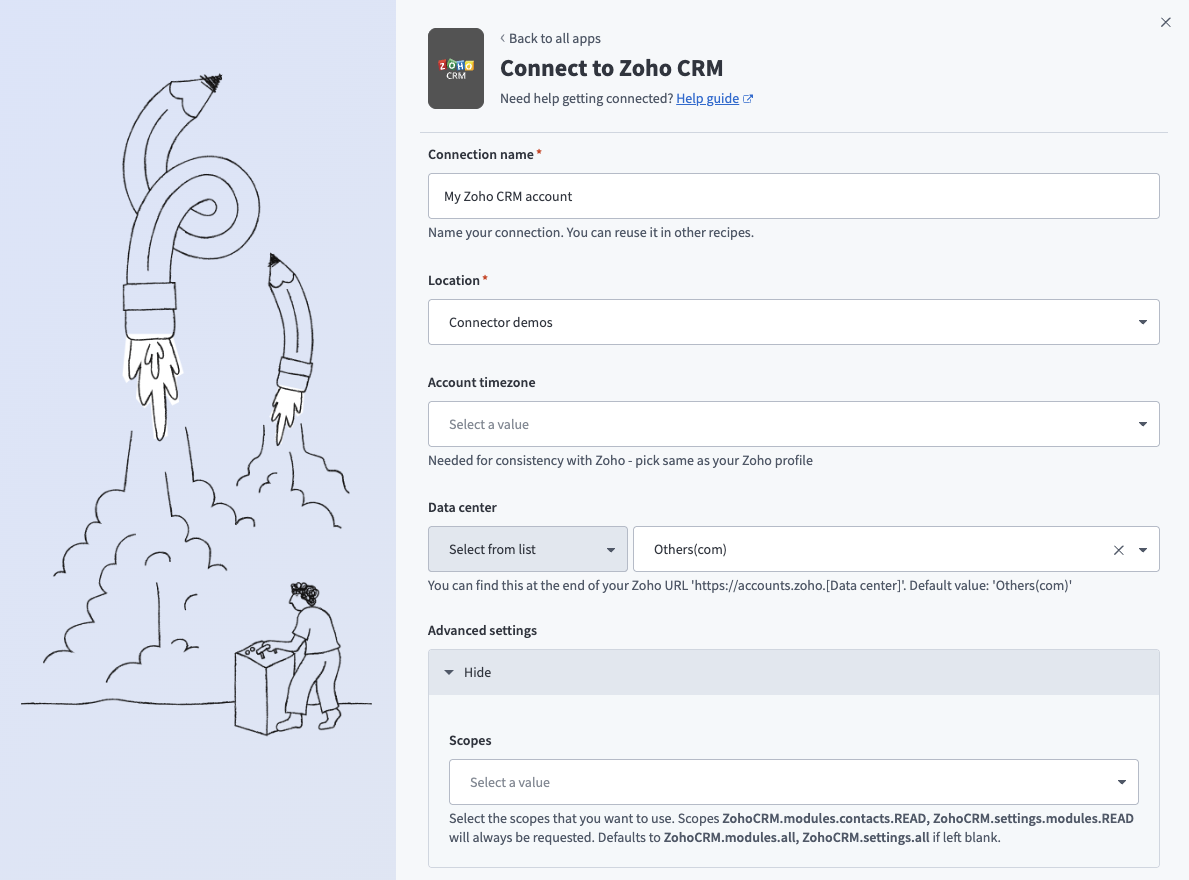 Connect to Zoho CRM
Use the Location drop-down menu to select the project or folder to store your connection.
Use the Account timezone drop-down menu to select your account timezone as specified in Zoho CRM.
Use the Data center drop-down menu to select your data center. You can find your data center at the end of your Zoho URL.
Expand the Advanced settings section to configure Scopes for your connection.
The following scopes are always requested:
ZohoCRM.modules.contacts.READZohoCRM.settings.modules.READ
Defaults to ZohoCRM.modules.all, ZohoCRM.settings.all if left blank.
Optional. Use the Custom OAuth profile drop-down menu to select a custom OAuth profile for your connection.
Click Connect.
Standard modules and fields
Refer to the Zoho CRM Platform Modules & Fields documentation for information about standard modules and their available fields in Zoho CRM.
Last updated: