Data orchestration - ETL/ELT
Extract, Transform, and Load (ETL) and Extract, Load, and Transform (ELT) are processes used in data integration and data warehousing to extract, transform, and load data from various sources into a target destination, such as a data warehouse or a data lake.
This guide will take you through sample recipes with explanations, that represent practical use cases of ELT/ETL.
Bulk vs Batch
Bulk/Batch actions/triggers are available throughout Workato. Bulk processing gives you the ability to process large amounts of data in a single job, especially suited for ETL/ELT. Batch processing is restricted by batch sizes and memory constraints, and are generally less suitable in the context of ETL/ELT.
Extract, Transform, and Load (ETL)
ETL begins with the extraction phase, where data is sourced from multiple heterogeneous sources, including databases, files, APIs, and web services. This raw data is then subjected to a transformation phase (cleansing, filtering, etc.) and finally loaded into a target system, typically a data warehouse.
Sample ETL Recipe
Refer to the sample ETL recipe for a working example.
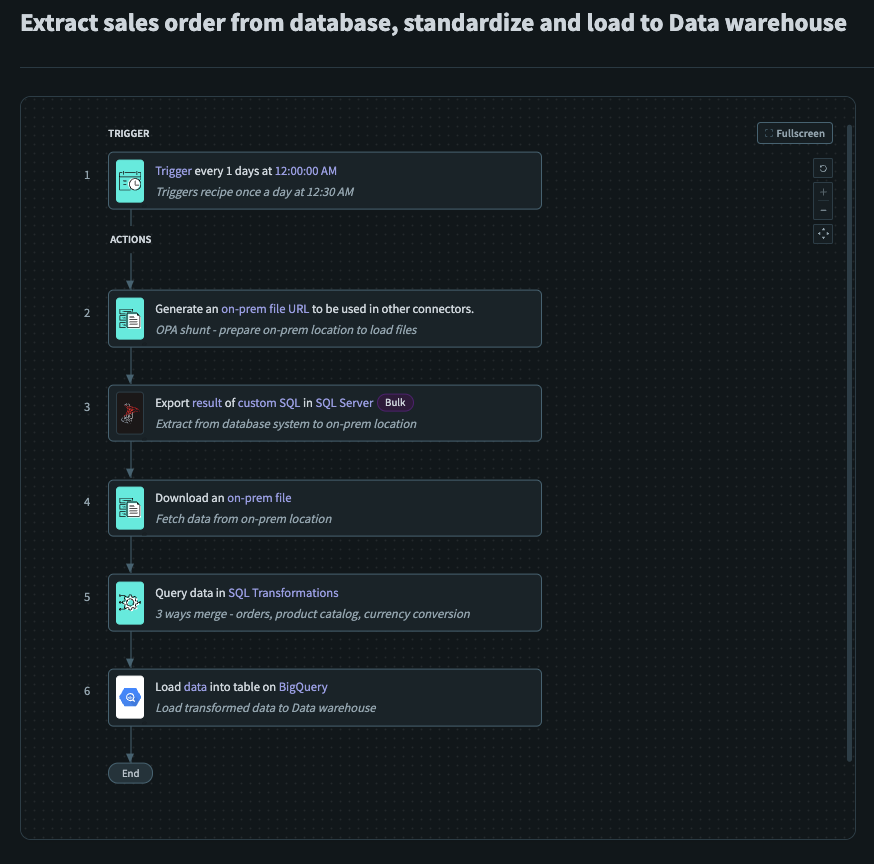 Sample ETL Recipe
Recipe Breakdown
The sample ETL recipe is a setup of how you can extract data from an on-prem data source (SQL Server), merge it together with a product catalog stored in Workato FileStorage and load this transformed output into a data warehouse (BigQuery). Additionally, Workato file streaming capabilities allows you to transfer data without having to worry about time or memory constraints. This recipe serves as a general guide when building ETL recipes, and performs basic transformations on data extracted from an on-prem data source before loading them into a data warehouse.
Setup
This recipe does not require any additional steps behind the scenes.
This recipe triggers on a schedule everyday at 0030. This trigger should be customized to your use case.
Used Generate on-prem file URL to prepare an on-prem location for the subsequent files to be loaded to.
Used Export query result (bulk) to extract the required Sales data from SQL Server, into the on-prem location specified in the previous step.
- Loads data into the on-prem file created earlier
Used Download an on-prem file to retrieve the Sales data from the on-prem location that was specified earlier.
- Retrieves the CSV content from the on-prem file created earlier
Used Query data using SQL Transformations to merge the Sales data with Product data retrieved from Workato FileStorage.
- Merge Sales and Product Data to produce a transformed output, appropriate for the business requirement
Used Load data into BigQuery to load the transformed data into a Data Warehouse.
- Final loading of the transformed output into a data warehouse
Extract, Load, and Transform (ELT)
Similar to ETL, ELT starts with the extraction phase, where data is extracted from various sources. ELT focuses on loading the extracted data into a target system such as a data lake or distributed storage. Once the data is loaded, transformations occur within the target system.
Sample ELT Recipe
Refer to the sample ELT recipe for a working example.
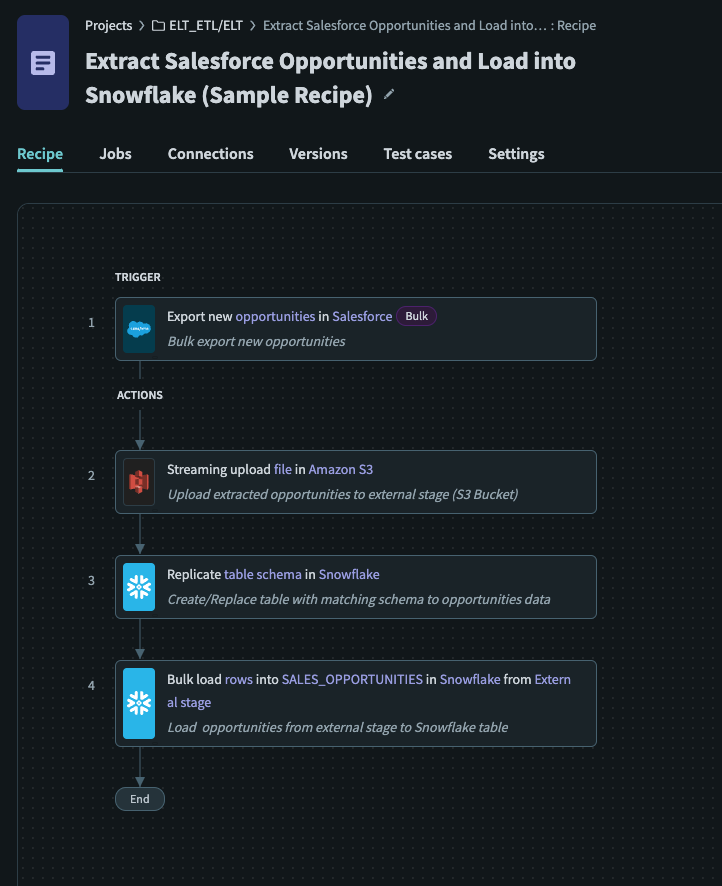 Sample ELT Recipe
Recipe Breakdown
The sample ELT recipe is a setup of how you can extract data from a cloud data source (Salesforce) into a data warehouse (Snowflake). This recipe serves as a guide when building ELT recipes, and performs the basic functionality of extracting bulk data from cloud data sources and loading them into a database.
Setup
- You should have set up an external stage on Snowflake with the necessary permissions. Refer to the Snowflake CREATE STAGE documentation for more information.
Create a new recipe, using Export new/updated records (Bulk) as the trigger.
- Configure the trigger according to your use case
- Bulk actions are best suited for extracting large amounts of data in a single job
Used S3 Upload file (streaming) action to upload the extracted CSV file contents to designated S3 bucket.
- Action streams the data extracted to the designated S3 bucket
Used Snowflake Replicate Schema action to create/update an new/existing table.
- This step is optional. If you have an existing table that matches the schema of the staged data, this step is not necessary
- Replicate schema ensures that the schema of the destination table in Snowflake exists and/or has an appropriate schema matching the source data.
Used Bulk load data to a table from an external stage to load data from staged files to an existing table.
- Loads data from staged file setup in the previous step into an existing table using the
COPYcommand
Data Transformation
This recipe does not show how transformation can be done in Snowflake. Data transformations can happen after loading data into a table, or even before. Refer to the Snowflake Querying data in staged files documentation for more information.
Last updated: