AgentX Support - Parameters
Parameters store information collected or generated during a conversation with an AI agent. The agent uses these parameters to guide the conversation, personalize responses, and enable automated actions.
For example, if a user selects Support as their reason for contacting your organization, the agent can store that choice in a parameter and use it to guide decisions later in the flow.
Assign a parameter to a node
You can create and assign parameters in the conversation flow builder. Parameters are typically assigned when a user reaches a specific node.
Complete the following steps to assign a parameter to a node in the conversation flow builder:
Select a node.
Locate the Additional Settings section.
Click Edit next to Assign Parameters.
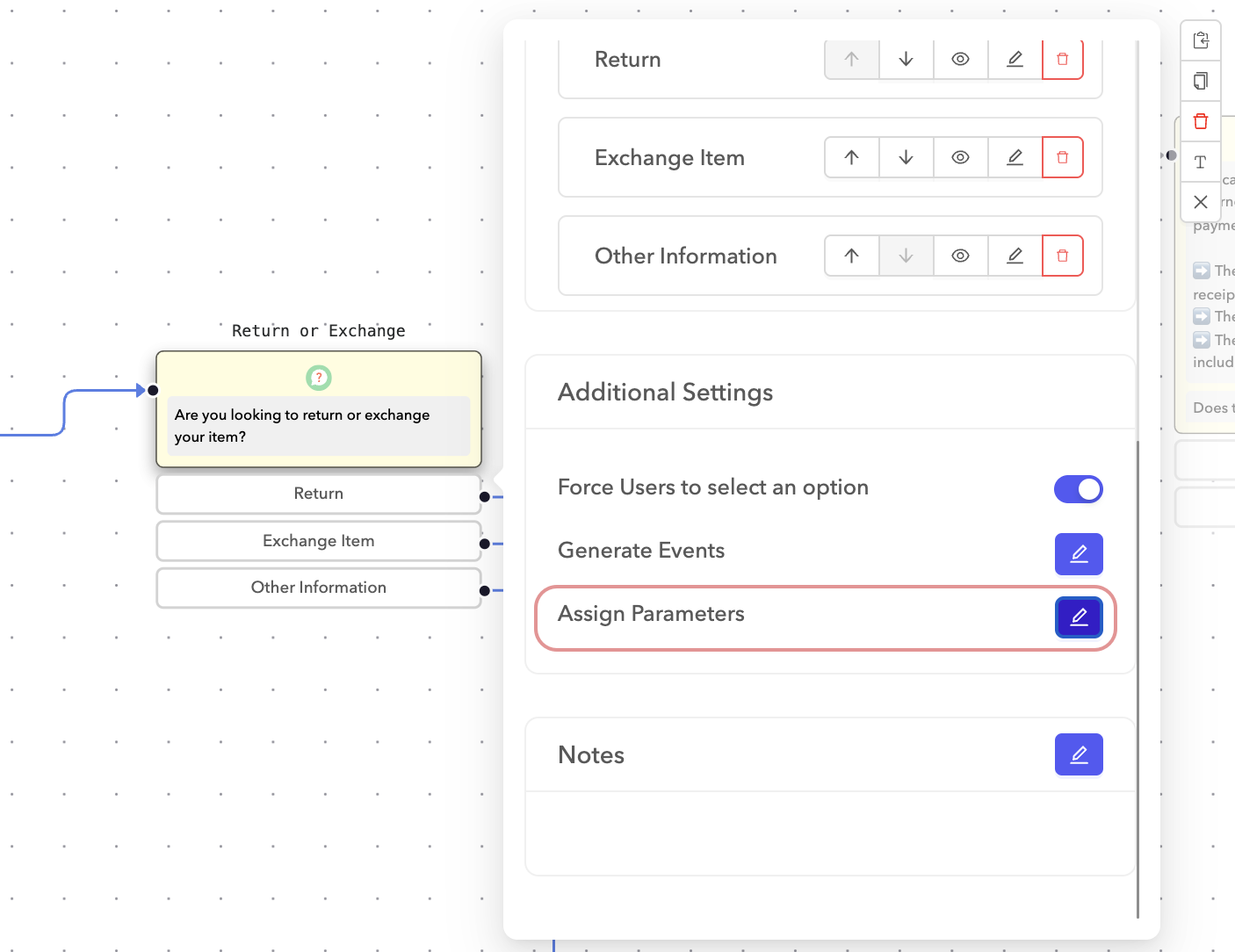 Assign parameters to a node
Add or update parameters.
PARAMETER ASSIGNMENT
Parameters are assigned after the node is evaluated and become available for use in subsequent steps.
Types of parameter values
You can assign the following types of values to parameters:
Fixed values
Fixed values allow you to set parameters using predefined values or system data.
| Parameter | Description |
|---|---|
$sys_transcript | Stores the transcript of the conversation up to this point. |
$sys_outgoing_transition | Captures the user's selection from a Question node into a parameter. |
$a.b.c | Copies a nested parameter value from the conversation context, useful for nested JSON responses. |
<Any Text Value> | Saves a custom text value in the parameter, available throughout the conversation. |
Action parameters
Action parameters allow you to define specific actions to take during flow execution. These are fixed value parameters with a value that serves as a property for the parameter.
| Parameter | Description |
|---|---|
__action_delay | Number of seconds to delay the transition to the next node. The maximum is 15 seconds. |
Predefined parameters
AgentX Support provides several predefined parameters to simplify flow configuration:
| Parameter | Description |
|---|---|
__sys_userIp | The IP address of the user. |
__sys_userAgent | The user agent string of the browser. |
__sys_userAgentParsed | Parsed representation of the user agent. |
__sys_userCountry | The user's country as identified by Cloudflare. |
__sys_conversationId | The unique conversation ID. |
__sys_userAction | The last action taken by the user. |
__sys_channel | The communication channel used for the conversation. |
__sys_activeIntent | The currently active intent in the conversation. |
browser_path | The URL path the AI agent was loaded on. |
browser_hostname | The hostname of the browser. |
browser_referrer | The referring URL of the webpage. |
browser_isMobile | Indicates if the user is on a mobile device. |
Expressions
Expressions allow you to transform data and store the result in a parameter. This can be useful for operations such as math, string manipulation, or using built-in platform functions.
Operators
The following operators can be used with conversation parameters:
| Operator | Description |
|---|---|
+ | Addition (x + y) or string concatenation (firstName + ' ' + lastName) |
- | Subtraction (x - y) |
/ | Division (x / y) |
* | Multiplication (x * y) |
** | Exponentiation (x ** y) |
% | Modulus (remainder) (x % y) |
== | Equals comparison (x == y) |
< | Less than comparison (x < y) |
> | Greater than comparison (x > y) |
<= | Less than or equal to (x <= y) |
>= | Greater than or equal to (x >= y) |
in | Check if something is contained within another ("spam" in "my breakfast") |
Utility functions
Utility functions are available to perform various operations on parameters:
| Function | Description |
|---|---|
DOUBLE | Converts a parameter to a floating point type. |
MD5 | Generates the MD5 hash of the parameter. |
INT | Converts a parameter to an integer type. |
STR | Converts a parameter to a string type. |
SORT_LIST | Sorts a list of values in ascending order. |
REVERSE_LIST | Reverses the order of a list of values. |
APPEND_LIST | Appends a value to a list. |
SUBSTITUTE | Substitutes part of a string. For example, SUBSTITUTE(param1, '-', '_'). |
FORMAT_DATE | Formats a date. For example, FORMAT_DATE(param1, <date_format>). For date formats, refer to strftime. |
REGEX_EXTRACT | Extracts a substring using regular expressions. For example, REGEX_EXTRACT(param1, <pattern>). |
SPLIT_PART | Splits a string into parts. For example, SPLIT_PART('Alex Workato', ' ', 1) extracts "Workato". |
CURRENT_DATE_BETWEEN | Checks if the current date is between two given dates or timestamps. |
Unset parameters
Unset parameters are placeholders that don't have a fixed or predefined value. This parameter type is set dynamically based on the user's context during the conversation.
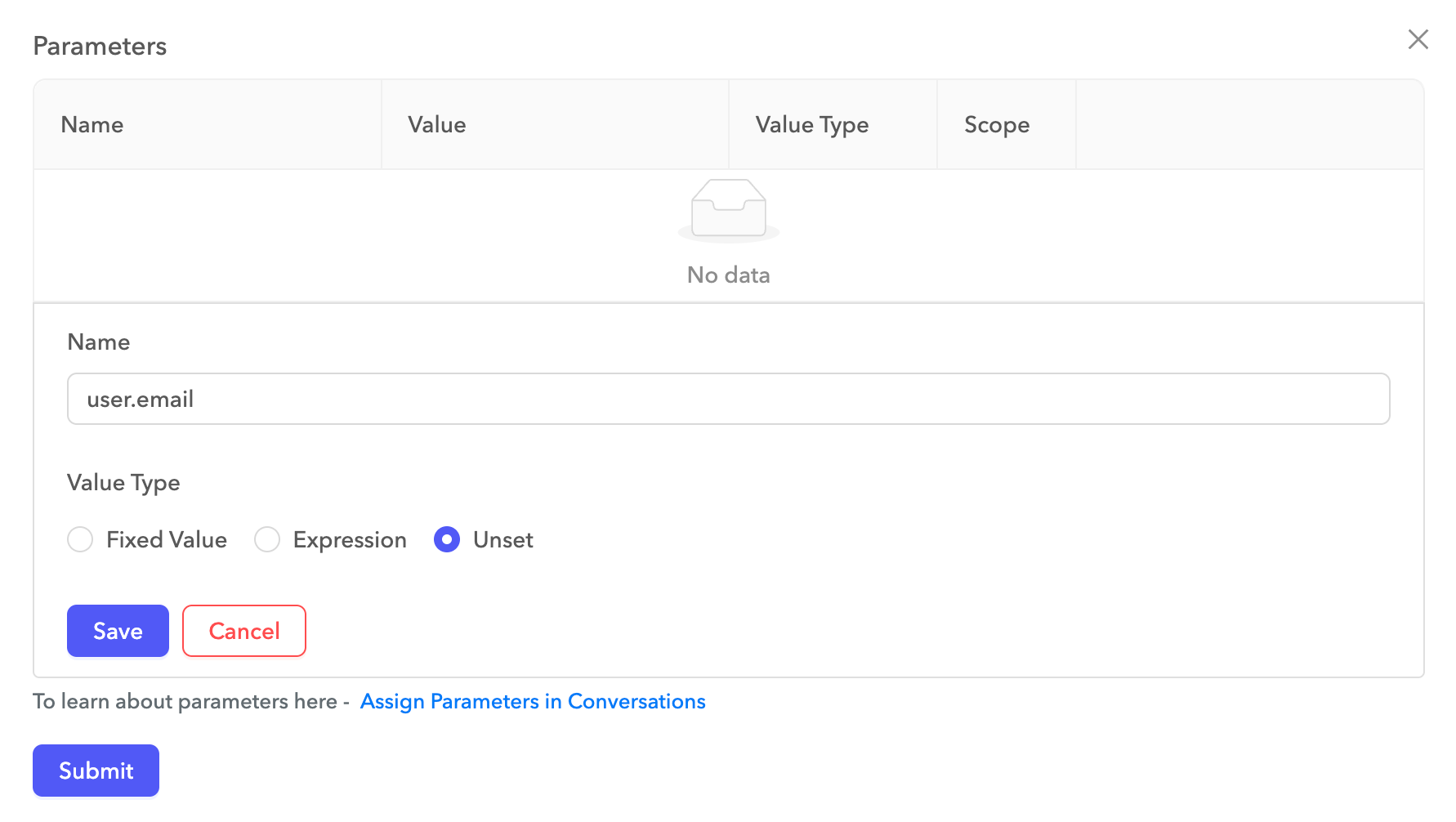 Unset parameters
Use parameters in messages
You can reference parameters in messages using templating. For example, if the AI agent collects the user's first name and stores it in a parameter called firstName, you can use a question node to display the following message:
Hi, {{ firstName }}. How can I help you today?Last updated: