# Jira - Triggers
The following Jira triggers can be used to kickstart workflows in your recipes.
To simplify API responses, the Jira REST API uses resource expansion, which means that the API will only return parts of a resource when explicitly requested. Workato automatically fetches and expands all parameters. Learn more about Jira's resource expansion (opens new window).
# How Jira real-time triggers work in Workato
When you use Jira real-time triggers in your recipes, Workato automatically registers a webhook in your Jira instance when the recipe is started. When the recipe is stopped, the webhook is removed.
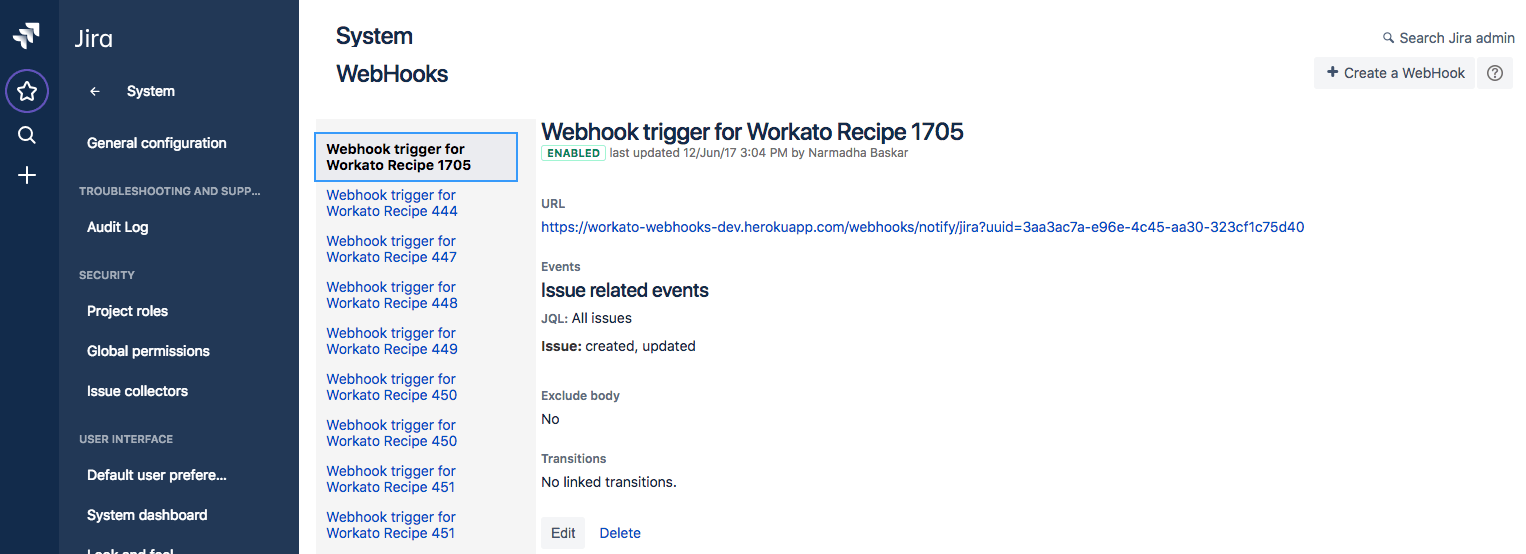 Jira webhooks registered by starting recipes
Registering and removing webhooks requires Jira administrator global permissions. If your Jira connection doesn't have these permissions, use a webhook trigger with the Webhooks connector instead.
Regardless of the state of the webhook, Workato continues to run a backup poll running every 6 hours, to pick up any events (related to the recipe trigger). Workato automatically removes any duplicates from the full list of events returned by Jira.
REAL-TIME TRIGGER SUPPORT FOR OAUTH 2.0
OAuth 2.0 doesn't support real-time triggers because it is incompatible with webhooks. Refer to the Jira connection guide to configure a different authentication method if you plan to use real-time triggers.
Alternatively, you can register the Webhooks connector in Jira to use Jira's static webhook functionality. Refer to the Atlassian Manage webhooks (opens new window) guide for registration steps.
# Deleted object (real-time)
The Deleted object (real-time) trigger monitors Jira for deleted objects in real-time.
# Export new issues in Jira
The Export new issues in Jira trigger retrieves new issues from Jira on a schedule you specify.
# Export new/updated issues in Jira
The Export new/updated issues in Jira trigger retrieves new or updated issues from Jira on a schedule you specify.
# New event (real-time)
The New event (real-time) trigger monitors Jira for new events in real-time.
# New issue
The New issue trigger checks Jira for new issues at an interval you specify.
# New issue (batch)
The New issue (batch) trigger retrieves new issues from Jira in batches at an interval you specify.
# New/updated comment (real-time)
The New/updated comment trigger monitors Jira for new or updated comments in real-time.
# New/updated issue (real-time)
The New/updated issue trigger monitors Jira for new or updated issues in real-time.
# New/updated worklog (real-time)
The New/updated worklog trigger monitors Jira for new or updated worklogs in real-time.
# Updated issue
The Updated issue trigger checks Jira for updated issues at an interval you specify.
# Updated issue (batch)
The Updated issue (batch) trigger retrieves updated issues from Jira in batches at an interval you specify.
Last updated: 3/19/2026, 7:59:26 PM